برنامج صيدليتك... شغال حتى لو الإنترنت فصل
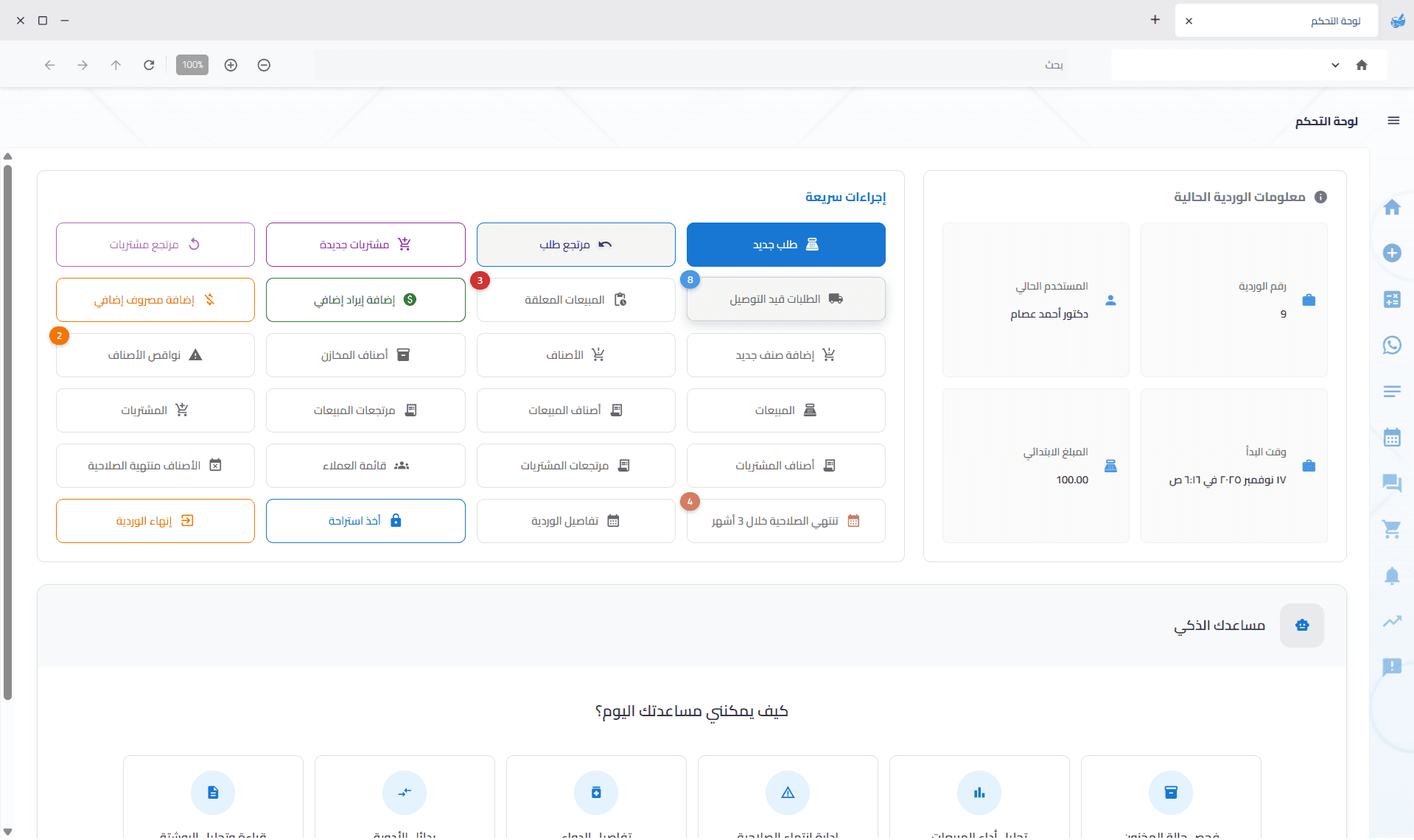
فارما سينك برنامج ويندوز مصمم للصيدليات. بيع، تابع المخزون، أدر المشتريات والحسابات من جهازك، واربط كاشيرات إضافية على نفس شبكة الصيدلية او بالهاتف المحمول — بدون الاعتماد على الإنترنت في شغلك اليومي. ومدعوم بالذكاء الاصطناعي عشان الشغل يبقى أسهل وأسرع.
- برنامج ويندوز يعمل بدون إنترنت
- تحكّم كامل في المخزون
- مبيعات ومشتريات فورية
- مدعوم بالذكاء الاصطناعي — أسهل وأسرع
إيصال البيع يروح لمصلحة الضرائب من نفس البرنامج
فعّل ETA لما تكون جاهز. ابعت الإيصال بعد كل طلب، أو سيبه لنهاية اليوم لو النت مش مستقر. البيع يكمل حتى لو الإرسال اتأجل.
- 1
فعّل الإعدادات
بيانات البائع الضريبية، بيانات نقطة البيع، والشهادة. ابدأ على بيئة التجربة قبل الإنتاج.
- 2
جهّز كود الصنف
GS1 من العبوة، أو سجّل EGS للأصناف اللي مالهاش باركود دولي.
- 3
ابعت دلوقتي أو راجع آخر اليوم
الإيصالات غير المرسلة تتجمع في الإقرار الضريبي اليومي لحد ما الاتصال يسمح.
بعد كل طلب أو نهاية اليوم
اختار المسار على حسب استقرار الإنترنت عندك.
بيع ومرتجع
المرتجع يستنى لحد ما البيعة الأصلية تبقى صالحة على المصلحة.
QR المصلحة بعد الاعتماد
إعادة الطباعة من قائمة المبيعات تحط الرمز تحت باركود الإيصال.
الكاشير مش بيتوقف
لو الخط فصل، الإيصال يفضل غير مُرسل وتكمّله بعدين.
المحادثات على الجهاز اللي تختاره
اقرأ ورد بدون فتح الموبايل. إشعارات المحادثة تظهر على الجهاز الذي تفعّله.
من الرسالة للبيع
اضغط اسم الدواء للبحث عن الصنف، وافتح ملف العميل أو فاتورة بيع، أو أضف الرقم كعميل جديد.
سجل حالة الإرسال
تابع الرسائل التي جهّزتها الصيدلية: في الانتظار، تم الإرسال، أو فشل الإرسال.
سداد الرصيد مع الإيصال
قالب يعرض المبلغ المدفوع والرصيد قبل السداد وبعده. لو صورة الإيصال ما اترفقتش، يتبعت النص.
اقرأ محادثات واتساب ورد من داخل البرنامج
شوف رسائل العملاء على الجهاز اللي تختاره، وجهّز الرد من نص الرسالة، وراجعه قبل ما يطلع. رسائل الطلب والتوصيل والمرتجع وسداد الرصيد تفضل من نفس الحساب.
- 1
سجّل الدخول على الجهاز الرئيسي
افتح واتساب من القائمة وامسح الرمز بموبايل الصيدلية، وخلّي النافذة مفتوحة أثناء الإرسال.
- 2
جهّز الرد من رسالة العميل
حدد النص واختار تجهيز رد: متاح، غير متاح، أو اكتب الرد. الرسالة ما تتبعتش لوحدها.
- 3
راجع ثم أرسل
الرد ينزل في خانة الكتابة. عدّله، وبعدين اضغط إرسال لما تكون جاهز.
الإرسال مش عبر واتساب الرسمي. استخدم رقم مخصص لرسائل العملاء من البرنامج.
ادفع لفريقك بعدل — تلقائياً
حدد قواعد العمولة مرة واحدة. كل بيع مكتمل يحسب عمولة البائع ويضيفها لصرف المرتب مع تفاصيل واضحة.
- 1
حدد القواعد
اختر عمولة افتراضية، ثم أضف استثناءات حسب الموظف أو الصنف أو مجموعة الأصناف.
- 2
بع كالمعتاد
عند إنهاء الطلب تُحسب العمولة وتُحفظ للبائع المعين على الطلب.
- 3
اصرف المرتب بوضوح
صرف المرتب يشمل عمولة المبيعات مع تفاصيل كل طلب.
نسبة أو مبلغ ثابت
استخدم نسبة من قيمة البيع أو مبلغاً ثابتاً لكل وحدة.
استثناءات عند الحاجة
تجاوز العمولة الافتراضية لأصناف أو مجموعات أو موظفين محددين.
معاينة قبل التطبيق
اختبر أي صنف مع أي موظف وشوف أي قاعدة هتتطبق.
المرتجعات تبقى عادلة
الأصناف المرتجعة تقلل العمولة بنسبة الكمية المرتجعة.
صيدليتك شغالة على جهازك
فارما سينك برنامج ويندوز بقاعدة بيانات محلية على الجهاز الرئيسي. الإنترنت ليس شرطًا للبيع وإدارة الصيدلية يوميًا.
بياناتك عندك
المبيعات والمخزون والعملاء والحسابات محفوظة على جهاز الصيدلية الرئيسي.
الإنترنت فصل؟ كمّل شغلك
البيع والمشتريات والجرد والورديات والتقارير تستمر حتى لو انقطع الإنترنت.
زود الكاشيرات بسهولة
اربط أجهزة إضافية أو نقطة بيع من الموبايل على واي فاي الصيدلية واستخدم نفس قاعدة البيانات المحلية.
السحابة اختيارية
الإنترنت يُستخدم للخدمات التي تحتاجه مثل التحديثات والنسخ الاحتياطي الاختياري والتنسيق بين الفروع.
كل فروعك... في صورة واحدة
كل فرع يحتفظ ببياناته محليًا، بينما يخليك تقدر فارما سينك مشاركة المخزون وتحويل الطلبات والتنسيق بين الفروع عندما تحتاج.
حوّل المخزون بين الفروع
انقل الكميات من الفرع الذي عنده زيادة للفرع الذي يحتاجها.
الصنف مش موجود عندك؟ دور عليه في الفروع
اعرف بسرعة أي فرع عنده الصنف والكمية المتاحة.
طلبات تزويد بين الفروع
اطلب الأصناف من فرع آخر من خلال سير عمل واضح وسهل المتابعة.
حوّل الطلب للفرع المناسب
لو صنف أو طلب مش متوفر عندك، حوّله لفرع يقدر ينفذه.
تواصل بين الفروع
مراسلة مباشرة بين فروع المجموعة من داخل فارما سينك.
الفاتورة دخلت؟ خلّي فارما سينك يقرأها.
ارفع فاتورة المورد، ودع الذكاء الاصطناعي يقرأ الأصناف والكميات والأسعار ويجهزها لك للمراجعة — بدل الإدخال اليدوي سطرًا سطرًا.
- 1
ارفع الفاتورة
صوّر الفاتورة أو ارفع ملفها كما وصلك من المورد.
- 2
فارما سينك يقرأها
يتعرف على الأصناف والكميات والأسعار ويحاول مطابقتها مع أصناف صيدليتك.
- 3
راجع واعتمد
راجع النتيجة واعتمد الفاتورة ليتم تحديث المخزون وسجل المشتريات.
اعرف مين بيشتري منك... ومين محتاج متابعة
شوف أفضل عملائك والأطباء المُحيلين، واعرف مين زاد نشاطه ومين بدأ يختفي — عشان تتابع في الوقت المناسب بدل ما تكتشف المشكلة متأخر.
أكثر العملاء شراءً
اعرف العملاء الأكثر قيمة وشوف حركة مشترياتهم بوضوح.
عملاء محتاجين متابعة
اكتشف العملاء الذين تراجعت مشترياتهم قبل ما تخسرهم.
أكثر الأطباء إحالةً
اعرف الأطباء الذين يرسلون لك أكبر عدد من العملاء وحافظ على العلاقات المهمة.
أطباء محتاجين متابعة
اعرف الأطباء الذين تراجعت إحالاتهم وحدد من يحتاج متابعة أولًا.
ملف العميل
رؤية 360° كاملة لكل عميل — الرصيد والنقاط والسجل والملاحظات في صفحة واحدة
بيانات العميل أثناء الطلب
اعرف تصنيف عميلك ومستوى ولائه فوراً أثناء إنشاء الطلب دون مغادرة الشاشة
تنبيهات العملاء المحتاجين متابعة
إشعارات فورية تلقائية عند انخفاض نشاط أي عميل
تنبيهات الأطباء المحتاجين متابعة
تنبيهات فورية عند انخفاض إحالات أي طبيب — تصرّف قبل أن تتآكل العلاقة
يعرف عميلك
اسم العميل مسحوب تلقائياً من الطلب المفتوح — لا حاجة للكتابة
يعرف الطبيب
إذا كان ثمة طبيب مرتبط بالطلب يظهر اسمه على الورقة تلقائياً
إرشادات مكتوبة واضحة
يغادر المريض بمرجع مطبوع لكل دواء — يقلل سوء الفهم الشفهي
فورية — أثناء الطلب
اطبع من زر إجراءات الطلب وهو لا يزال مفتوحاً — لا حاجة للإتمام أولاً
ورقة الجرعة جاهزة من نفس الطلب
اطبع ورقة جرعة مخصصة بنقرة واحدة والطلب لسه مفتوح. بيانات العميل والطبيب تُسحب تلقائيًا من الطلب.
بسيطة جدًا
افتح الطلب، اضغط إجراءات الطلب، ثم اطبع. لا إدخال يدوي ولا خطوات إضافية.
شاهد فارما سينك في العمل
اكتشف قوة البرنامج
فارما سينك - خصم على الاشتراك السنوي لفترة محدودة
الحل الأشمل لإدارة الصيدليات
ليه فارما سينك؟ لأن شغل الصيدلية محتاج برنامج يعتمد عليه.
اشتغل حتى لو الإنترنت فصل
برنامج ويندوز بقاعدة بيانات محلية، لذلك تقدر تبيع وتتابع المخزون والتقارير بدون اتصال بالإنترنت.
اعرف مخزونك بوضوح
تابع الكميات والصلاحيات والتنبيهات من مكان واحد.
أكثر من كاشير على نفس الشبكة
اربط أجهزة إضافية بنفس قاعدة بيانات الصيدلية بدون حساب سحابي لكل جهاز.
بياناتك تفضل عندك
بيانات التشغيل محفوظة محليًا، مع نسخ احتياطي اختياري واستعادة آمنة.
تقارير تساعدك تاخد قرار
حوّل بيانات البيع والمخزون والمشتريات إلى معلومات واضحة تساعدك في إدارة الصيدلية.
كل اللي تحتاجه لإدارة صيدليتك
من البيع والمخزون للمشتريات والعملاء والفروع — كل شغلك في نظام واحد.
ابدأ في خطوات بسيطة
ثبّت فارما سينك
ثبّت البرنامج على الجهاز الرئيسي، وسيتم إنشاء قاعدة البيانات المحلية تلقائيًا.
اربط أجهزتك
أضف كاشيرات أو نقطة بيع من الموبايل على نفس شبكة الصيدلية.
ابدأ شغلك
بيع واشترِ واعمل الجرد واطبع التقارير حتى لو الإنترنت غير متاح.
كبر شغلك
أضف أجهزة أو اربط فروعك عندما تكبر، مع احتفاظ كل فرع ببياناته محليًا.
متطلبات تشغيل البرنامج
تأكد إن جهاز الصيدلية مناسب قبل التثبيت — عشان البرنامج يبقى سريع وثابت.
ويندوز 10 أو أحدث
يشتغل على ويندوز 10 وويندوز 11. لا يشتغل على ويندوز 7.
هارد SSD
استخدم SSD. على هارد HDD عادي البرنامج بيبقى بطيء.
الذاكرة (الرام)
- الحد الأدنى4 جيجا
- المُوصى به8 جيجا
- ممتاز16 جيجا
سعر واضح من غير مفاجآت
اشتراك سنوي واحد، وكل المميزات الأساسية مشمولة.
كل نقطة بيع موبايل مسموح بها: 1000 ج.م سنوياً رسوم إضافية لكل جهاز
حوّل أي موبايل إلى كاشير
اربط الموبايل بشبكة الصيدلية عن طريق QR، وابحث عن الأصناف أو امسح الباركود، وأنهِ الطلب من الموبايل ليظهر مباشرة على الكمبيوتر.
- 1
اربطه بـ QR
افتح نقطة بيع الموبايل على الكمبيوتر وامسح رمز QR بالموبايل على نفس شبكة الصيدلية.
- 2
ابدأ البيع
ابحث عن الدواء أو امسح الباركود، وأضف الأصناف للسلة وأنهِ الطلب.
- 3
الطلب يظهر على الكمبيوتر
بعد الإنهاء يصل الطلب إلى قائمة الطلبات المعلقة على الكمبيوتر، بينما يظل المخزون والوردية في القاعدة المحلية.
كل جهاز نقطة بيع موبايل مسموح به عليه رسوم إضافية 1000 ج.م سنوياً.
كاشير إضافي بدون كمبيوتر
وقت الزحمة، استخدم موبايل موجود بالفعل بدل شراء جهاز جديد.
كاميرا الموبايل هي الماسح
امسح الباركود العادي أو رمز QR مباشرة بالكاميرا.
اربطه مرة واحدة
بعد الربط الأول، افتح نفس الرابط لاحقًا بدون إعادة مسح QR.
يعمل على شبكة الصيدلية
البيع يتم داخل الشبكة المحلية، ولا يحتاج إنترنت.
جاهز تشوف فارما سينك على صيدليتك؟
احجز عرضًا تجريبيًا مجانيًا وخلّينا نوريك البرنامج عمليًا على احتياجات صيدليتك.
احجز عرضًا مجانيًا